How to use Stacks Market to Borrow Assets
Learn how to supply collateral, select a Risk Group and borrow supported assets through Stacks Market.
Start by visiting https://app.zestprotocol.com and connecting your Stacks wallet. We currently support Leather , Xverse , OKX Wallet , Fordefi , and Asigna .
Getting Started
Each collateral to debt asset pair has different borrowing paremeters. Learn more here: #risk-parameters-introduction
Before you can borrow, you’ll need to supply an asset to be used as collateral. Please refer to How to use Stacks Market to Earn Yield.
Only assets with a checkmark under the ‘Collateral’ column are eligible.
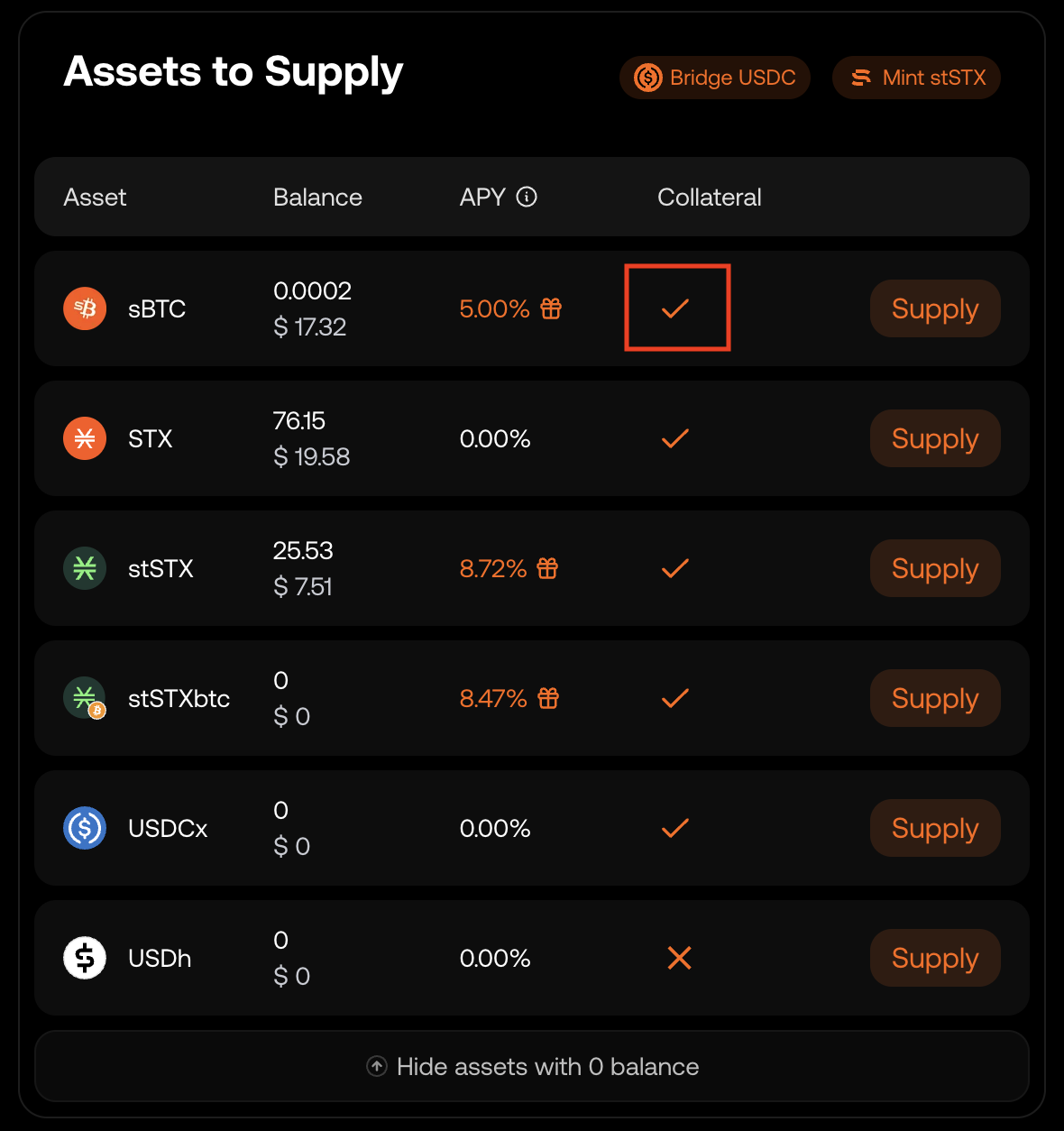
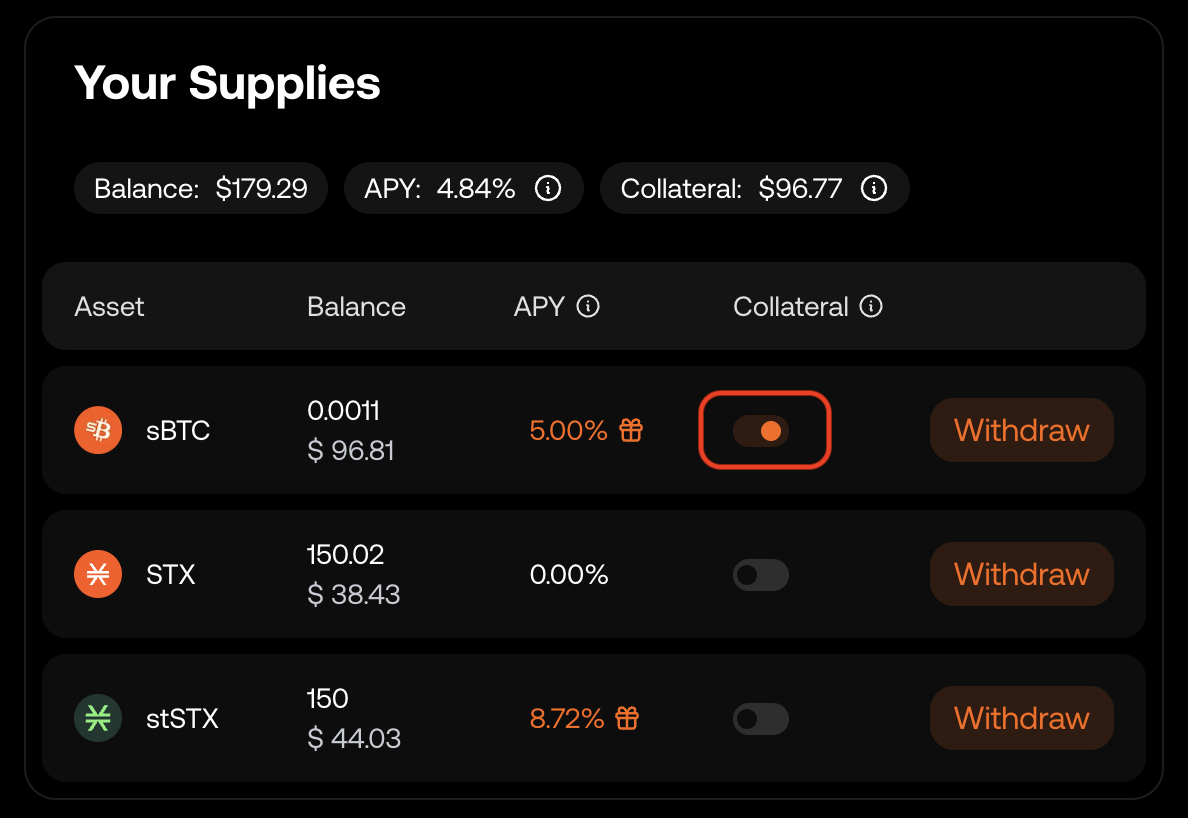
The first asset you supply, will be enabled as collateral by default. Instead, to change the enabled collateral asset:
- Ensure you have no active borrowing positions
- Disable the ‘Collateral’ toggle for your currently designated collateral asset and approve the transaction
- Enable the ‘Collateral’ toggle for the new asset and approve the transaction
Borrowing Against Your Collateral
Once you’ve supplied collateral, ‘Borrow’ buttons will appear in orange under ‘Assets to Borrow’.
To proceed:
– Find the asset you wish to borrow and click ‘Borrow’
– This will open the ‘Borrow $XYZ’ popup
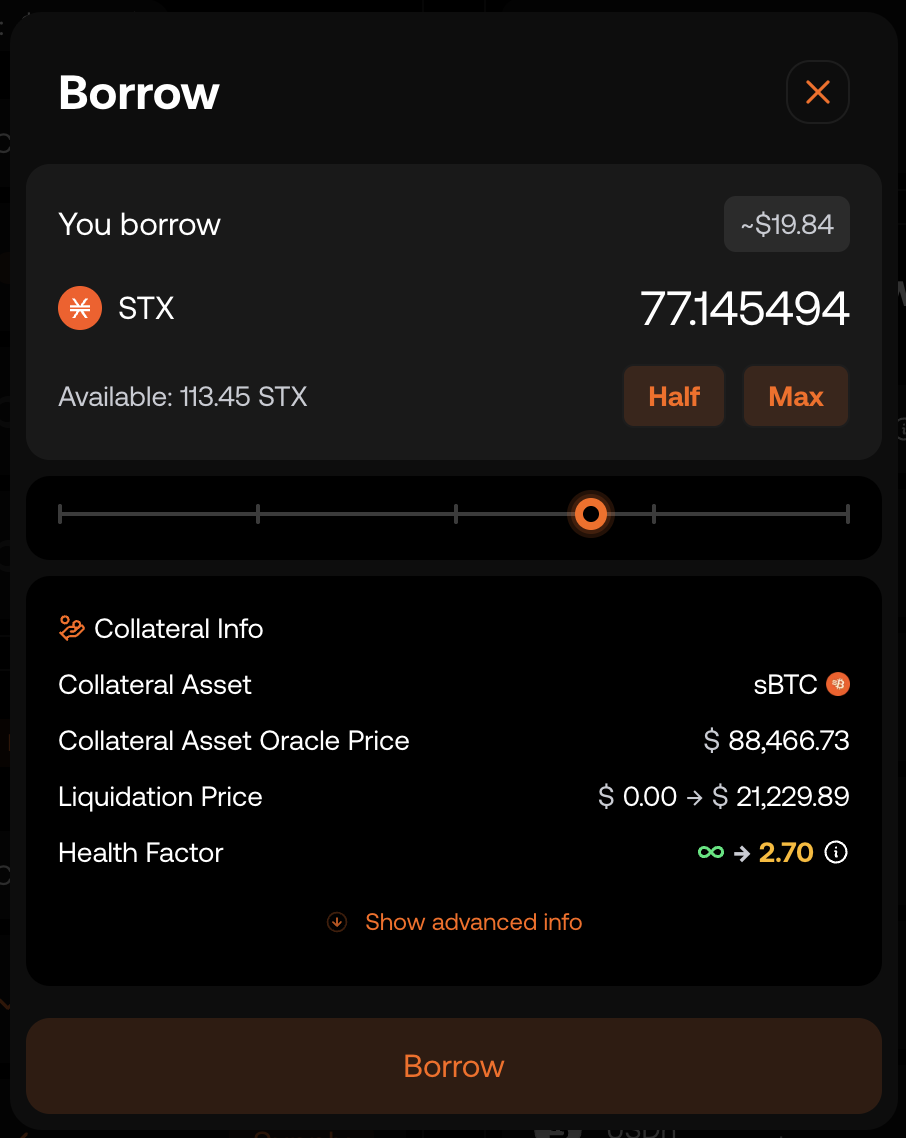
In the Borrow $XYZ popup, a user can see how much they can borrow along with the estimated liquidation price and health factor, both of which update dynamically as they adjust the borrow amount.
The liquidation price is the collateral asset price at which your collateral will get liquidated. If you get liquidated, you get to keep the asset you borrowed but you lose (potentially all of) your collateral.
If your Health Factor drops below 1, your position will be eligible for full liquidation. Partial liquidation are eligible slightly above 1 (depending on LTV rate).
Understanding the ‘Borrow $XYZ’ Popup
1) LTV (Loan-to-Value):
The ratio between your borrowed amount and the value of your supplied collateral.
Example: If you supply $1,000 and borrow $500, your LTV is 50%.
2) Max LTV:
The maximum LTV allowed before borrowing is no longer permitted.
3) Liquidation Threshold:
The LTV level at which your loan becomes unsafe, triggering the risk of liquidation. If your LTV crosses this threshold, your collateral may be partially (partial liquidation threshold) or fully sold (full liquidation threshold) to repay your debt.
Note
Once the partial liquidation threshold is reached, the position becomes eligible for partial liquidations. The closer the LTV gets to the full liquidation threshold, the larger the percentage of the position that can be liquidated.
To learn more about liquidation, see:#what-happens-when-i-get-liquidated
When you have opened a loan, interest automatically accrues to your debt in the UI.
Borrowing Position Status
Once a borrowing position is active, the Position Status bar gives a clear view of its health. Additional details about your position sit just above the bar.
You can continue borrowing until the first yellow marker, which indicates you’ve reached the maximum LTV.
If your status reaches the second yellow market, partial liquidation will occur, meaning part of your position will be liquidated.
If your status moves past the red marker, the position becomes eligible for full liquidation.
See here for more on liquidation: #what-happens-when-i-get-liquidated

Repaying your Loan
You can repay your loan in full or partially at any time by clicking ‘Repay’.
Partial repayments reduce your LTV and lower liquidation risk. Entering an amount in the ‘Repay’ field will display your updated liquidation price and health factor.
Topping up Collateral
You can also reduce liquidation risk by supplying additional collateral.
To do this, deposit more of the asset you have enabled as collateral via ‘Assets to Supply’.
The UI will display your new liquidation price.
Example: If you’ve enabled stSTX as collateral, you must supply additional stSTX to strengthen your position.
What Happens When I Get Liquidated?
Stacks market uses ad-hoc borrowing parameters based on each collateral–debt pair, which determines when liquidation can occur. Check Risk Groups below to learn more: #risk-parameters-introduction
For example, assume you use sBTC as collateral and borrow USDC, with a 60% LTV, an 70% partial liquidation threshold, and a 75% full liquidation threshold.
If you deposit $1,000 worth of sBTC, you can borrow up to $600. If your LTV reaches 70%, the position becomes eligible for partial liquidation, with a penalty of approximately 5–10%.
As the LTV approaches the full liquidation threshold, a larger portion of the position can be liquidated. For instance, at 72.5% LTV, up to 50% of the position may be liquidated, while at 77% LTV, the entire position is liquidated.
There are 3 main scenarios in which liquidation may be triggered:
| Scenario | Initial Collateral (STX) | Initial Loan (Asset) | What Changes? | When Liquidation Happens | Result After Liquidation |
|---|---|---|---|---|---|
| 1. Interest builds up | $1,000 | $500 | Interest increases loan balance | LTV reaches liquidation threshold due to loan growing | Collateral liquidated to pay off USDC loan + 10% penalty |
| 2. Borrowed asset goes up | $1,000 | $500 in volatile asset (e.g BTC, STX, ecc) | BTC price increases | LTV reaches liquidation threshold due to borrowed asset rising | Liquidation + penalty unless more collateral is added |
| 3. Collateral drops in value | $1,000 in volatile asset (e.g BTC, STX, ecc) | $500 | Collateral price drops | LTV exceeds liquidation threshold due to collateral falling | Liquidation + penalty unless more collateral is added |
Risk Parameters Introduction
Each Risk Group applies to a single collateral–debt pair, allowing parameters to be optimized for that specific combination.
To view any Risk Group’s parameters in Stacks Market, you can:
- Click “Details” for any asset under Assets to Borrow in the Dashboard
- Click “Details” for any asset in the Assets Overview section (add link)
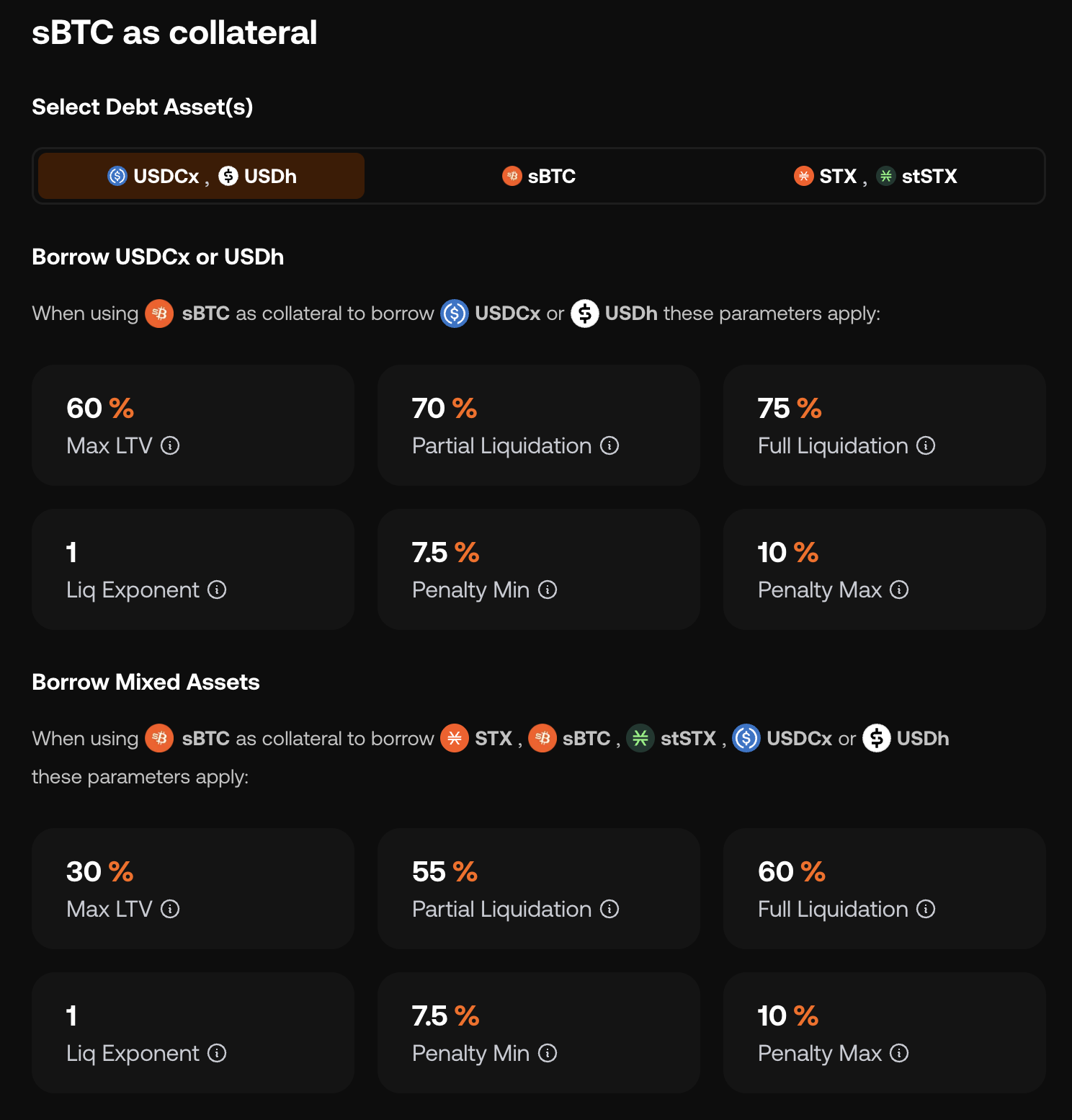
On the asset detail page, scroll to the “[asset] as collateral” section.
This section shows the parameters for that asset when used as collateral relative to each available debt asset, and the top-right selector lets you switch between those debt assets.
Further detail on risk groups and parameters is available in the following V2 Market Design subsection:
1) Risk Groups