> For the complete documentation index, see [llms.txt](https://docs.zestprotocol.com/start/llms.txt). Markdown versions of documentation pages are available by appending `.md` to page URLs; this page is available as [Markdown](https://docs.zestprotocol.com/start/borrow/how-to-use-stacks-market-to-earn-yield.md).
# How to use Stacks Market to Earn Yield
Learn how to supply supported assets to Stacks Market, receive vault tokens and earn interest from borrower activity.
## Supplying Assets
Visit [https://app.zestprotocol.com](https://app.zestprotocol.com/) and connect a Stacks wallet. We currently support [Leather](https://leather.io/), [Xverse](https://www.xverse.app/), [OKX Wallet](https://www.okx.com/web3), [Fordefi](https://fordefi.com/), and [Asigna](https://asigna.io/).
**Before depositing liquidity, mare sure the market selector/switch is set on the V2.**
Under **“Assets to supply,”** select the asset you want to earn yield on and click **“Supply.”**
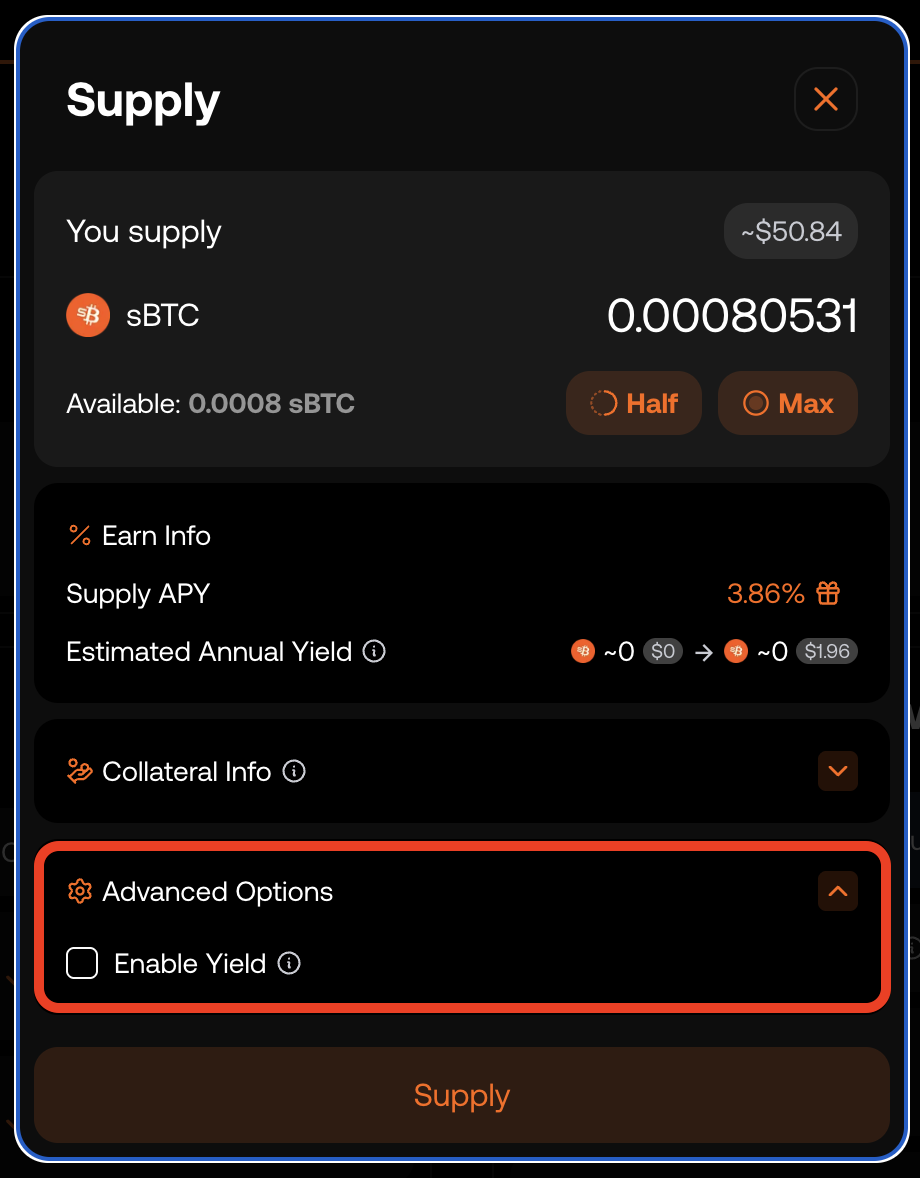
A popup will appear where the user chooses the deposit amount and sees information on supply APY, projected annual yield, and collateral details.
The popup will also include an **“Advanced Options”** button that lets users activate the optional **no-rehypothecation** feature.
By disabling the **"Enable Yield"** box, a user’s deposits remain fully segregated as their own collateral and are never lent out (so the deposit does not earn yield).
{% hint style="info" %}
1\) Whichever mode you first use for Asset A (rehypothecated or not) applies to all later supplies of that asset. To change modes, you must withdraw the position and supply it again under the new choice.
2\) Switching between the two modes cannot be done on an existing position.
To move from rehypothecated to non-rehypothecated (or the reverse), you must withdraw the current position and then supply the asset again under the desired setting.”
{% endhint %}
After clicking **“Supply”** in the popup, the user must approve the transaction in the wallet window.
When the **“Transaction Broadcast”** screen appears, wait a few seconds for confirmation on the Stacks network.
{% embed url="" %}
Once confirmed, your supply position becomes active and begins earning continuously compounding yield. Your active lending position can be found under **‘Your Supplies’**.
That’s all there is to it.
## Native BTC Deposits
[Clicking the "Earn" button](https://app.zestprotocol.com/earn-btc) in the navigation bar lets you deposit native BTC into Zest Protocol's Stacks Market V2 to earn yield on Bitcoin without holding STX (Stacks transactions are currently sponsored by Zest Protocol).
The process has two steps:
**1) Move BTC to Stacks.** This transaction converts BTC into sBTC. If you haven't connected your Bitcoin and Stacks wallets, you'll be prompted to do so. The process takes 20 to 40 minutes, since the transaction must be confirmed on both Bitcoin and Stacks.
**2) Supply sBTC to Zest Protocol.** This step requires two transactions: the first enrolls you for BTC yield rewards, and the second deposits the sBTC into Zest Protocol. Both transactions complete in a few seconds
## Withdrawing Assets
When you're ready to stop earning yield, click **‘Withdraw’** on the asset you wish to redeem under **‘Your Supplies’**. Once the transaction confirms, your assets will be returned.
The withdrawal popup will also show how the amount you withdraw affects your borrowing position, if you have one.
If you select **‘Max’**, you’ll receive your full balance, original deposit plus accrued yield.
{% hint style="info" %}
**Note:** If you have an active borrowing position, it must be fully repaid before you can withdraw the corresponding supplied assets
{% endhint %}
{% embed url="" %}